


The Animal Crossing: New Horizons 3.0 update introduced the much-anticipated Slumber Islands, offering players a new way to create and play with blank-canvas islands. For many fans, this sounded like a dream come true, more spaces to design, share, and collaborate with friends. But as players have jumped into this feature, it’s clear there are both fun opportunities and frustrating constraints. This ACNH 3.0 Slumber Island guide breaks down what you can actually do on Slumber Islands, what's off-limits, and how to get the most out of this creative mode.
ACNH 3.0 Slumber Island: What's New?
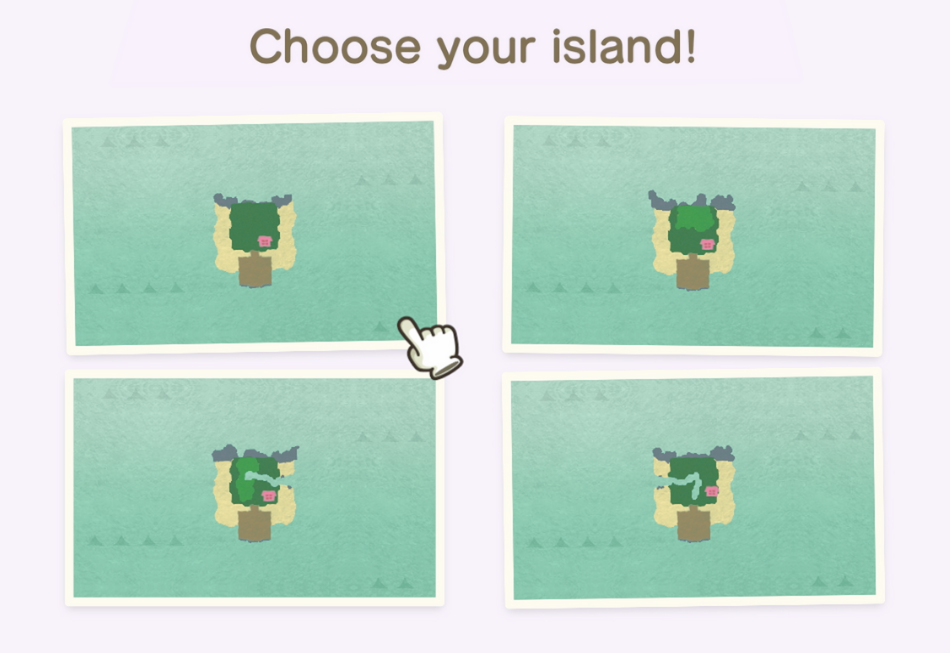
With version 3.0, Animal Crossing: New Horizons added Slumber Islands as a fresh online feature. These islands live in Luna’s dream world and let players build outside the boundaries of their regular island. Slumber Islands require a Nintendo Switch Online membership, and you can create up to three personal islands, each with a choice of size and layout. Unlike the Dream Suite, which lets you visit other players’ uploaded islands, Slumber Islands are designed for real-time creativity—solo or with friends.
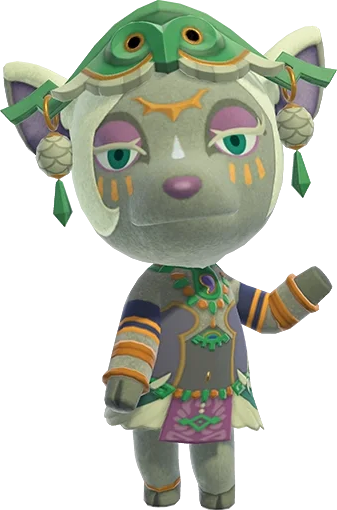
Players wake up on a large pier instead of the usual airport, greeted by Luna and equipped with tools to decorate, terraform, and invite friends for multiplayer sessions. It opens up a new sandbox, but with a set of rules and restrictions that shape what’s possible.
ACNH Slumber Island Requirements
To access and use Slumber Islands in Animal Crossing: New Horizons 3.0, you’ll need to meet the following conditions:
Nintendo Switch Online Membership:
You must have an active Nintendo Switch Online subscription. This is required for both creating and visiting Slumber Islands, even if you’re playing alone.Internet Connection:
A constant internet connection is needed while you’re on a Slumber Island. If you disconnect, you’ll be sent back to your regular island.Unlock Luna’s Dream Suite:
Your house must be upgraded from the original tent. Once you have a house, Luna’s Dream Suite will become available to you.Receive Luna’s Invitation:
After unlocking Dream Suite, Luna will send you a letter about the new dream space. Make sure to check your mailbox for this invitation.Access via Bed:
To enter your Slumber Island, simply lay down in any bed in your house and choose the “It’s slumber time” option when prompted.
What To Do on ACNH 3.0 Slumber Island?
Now that you know the basics, let’s focus on what’s possible once you arrive on your Slumber Island:
Decorate and Terraform Freely
Players have the freedom to decorate and reshape the terrain of their Slumber Islands however they want. All items you've catalogued are available for instant placement, allowing for rapid design iterations and creative builds. Terraforming is fully enabled, letting you adjust cliffs, rivers, and land without the usual restrictions.
Choose Island Layout and Size
At creation, you can pick from three sizes (small, medium, large) and select a preferred layout. Each size offers four layout options featuring different river and cliff arrangements, so you have a starting point that fits your vision.
Customize Weather and Time of Day
You can set the time of day and weather to suit the mood or lighting you want for your island. This is useful for themed builds or for showing off your designs under the perfect sky.
Multiplayer Decorating
Slumber Islands shine as collaborative spaces. Invite friends to join you online, everyone can place furniture, terraform, and help with design. It’s the only place in ACNH where multiple players can modify an island’s layout and decor at the same time.
Add Villagers as NPCs
Players can add villagers to walk around the island. Both current and past residents from your main island can be summoned, and they’ll appear as decorations, waving as you pass by, adding some life to your builds.
Move and Upgrade Your House
Your own house is the only permanent building. You can move it, change its exterior, and redecorate the inside, allowing for some personal expression on each island.
Use Custom Designs (With Caveats)
Each Slumber Island has its own set of custom design slots. You can bring over designs from your main island and use them for paths, decor, and item customization. Design slots are independent, so overwriting a slot on your main island won’t erase it from your Slumber Island.
ACNH Slumber Island Villagers
Though you can add villagers to Slumber Islands, but villager functionality on Slumber Islands is quite different from your main island. Initially, the island is empty of inhabitants, but you can add villagers to walk around just like furniture items. This includes both your current residents and villagers you’ve had in the past. However, their behavior is limited; they’ll wander the island and wave when approached, but they don’t have unique dialogue or interactions.
You won’t be able to place villager houses, decorate their interiors, or set up themed neighborhoods. There’s no way to use amiibo to invite new villagers, and you can’t change their outfits. Plus, every time you leave and return to your Slumber Island, the villagers vanish and have to be placed again if you want them back. For players who wanted to create lively, bustling towns with decorated homes and social villagers, these limits can make the experience feel a bit lifeless.
What You Can't Do on ACNH 3.0 Slumber Island?
However, it’s just as important to be aware of the restrictions that come with this new mode. There are key features that remain out of reach:
No Adding or Removing Buildings
Aside from your own house, no other buildings can be placed. This means no resident services, villager houses, shops, or other structures. The absence of these buildings leaves islands feeling empty, limiting the kinds of towns or villages you can create.
No Season Change
You can adjust the time and weather, but the season always matches your main island. Dreaming of a winter wonderland while your main island is in spring? That’s not possible here. This restriction dampens the excitement for making islands themed to holidays or specific seasons.
No Amiibo Support or Villager Houses
Villagers can be placed as wandering NPCs, but you can’t use amiibo to invite specific ones, nor can you give them houses or customize their interiors and outfits. The villagers just walk around and wave, they don’t interact or talk.
Limited Item Access
Only items that you’ve already catalogued are available for placement. There’s no access to the full item catalog as seen in Happy Home Paradise or the hotel, so if you want to use something new, you’ll need to add it to your main island’s catalog first.
No Design Portal Access
You can’t open the custom design portal directly on your Slumber Island. To use new designs, you have to download them to your main island first, then port them over. This process can be tedious, especially if your design slots are full.
No Sharing or Uploading Slumber Islands
There’s no way to upload your Slumber Island for others to visit asynchronously, and you can’t share custom designs made on Slumber Islands through the portal. Designs stay on the island and can’t be transferred back to your main island.
Villager and Player Resetting
Whenever you revisit your Slumber Island, the appearance and outfit you gave your character reset, and any villagers you placed vanish and need to be redeployed. The weather and time settings also reset to match your main island.
Best Ways To Play ACNH 3.0 Slumber Island
With these possibilities and limits in mind, it helps to consider how to get the most enjoyment from Slumber Islands.
Build With Friends
Slumber Islands are best enjoyed as multiplayer creative spaces. Gather friends and work on big projects together, terraforming, laying paths, and setting up scenery. Since everyone can decorate at once, it’s a great way to bond and see ideas come together quickly.
Plan Themed Mini-Games or Events
Use Slumber Islands to set up obstacle courses, races, or scavenger hunts. Since items can be placed instantly and the terrain can be shaped freely, you can easily build and reset custom games for your group.
Try Out New Design Ideas
If you’re not ready to commit to a major overhaul on your main island, use a Slumber Island as a testbed. Experiment with layouts, color palettes, and furniture combinations to see what works before bringing ideas back home.
Coordinate Custom Designs
Since there’s a workaround for bringing custom designs over, plan ahead and set aside designs on your main island specifically for Slumber Island use. You can also team up with friends: have them bring designs you want, or help each other fill up the slots more efficiently.
Accept the Limitations and Focus on Creativity
While the feature feels incomplete in places, there’s still room for creativity. Focus on what’s possible, large builds, terraforming experiments, and multiplayer fun, rather than what’s missing.
ACNH Slumber Island Season Change Possible With Time Travel?
Seasonal control is a highly requested feature in creative Animal Crossing modes, but on Slumber Islands, the season is fixed to whatever is currently active on your main island. There’s no option to set your Slumber Island to autumn for a Halloween build, or to winter for a snowy holiday vibe. Even though you can adjust the time of day and weather for each session, the broader seasonal look—like fall leaves or cherry blossoms—remains tied to your main island’s calendar.
If you try to time travel and set your island’s season before entering the Slumber Island, it will still sync back to the present whenever you return. This means you can’t “lock in” a season for a themed build, which is disappointing for anyone hoping to run multiple seasonal projects at once. The inability to change seasons also affects available bugs, fish, and the general atmosphere, further limiting creative possibilities.
The 3.0 update’s Slumber Islands add much-needed flexibility to Animal Crossing: New Horizons, letting players build and decorate new spaces with friends. However, the mode comes with a number of frustrating limits—no seasonal changes, no extra buildings, and no easy sharing of designs or islands. Those hoping for a full creative mode will find themselves wishing for more features, but with some planning and teamwork, Slumber Islands can still offer a satisfying sandbox for collaborative projects and design experiments.
If you’re willing to work around the constraints, there’s fun to be had in this dreamy addition—just manage your expectations and make the most of what’s available.